December 19th, 2025

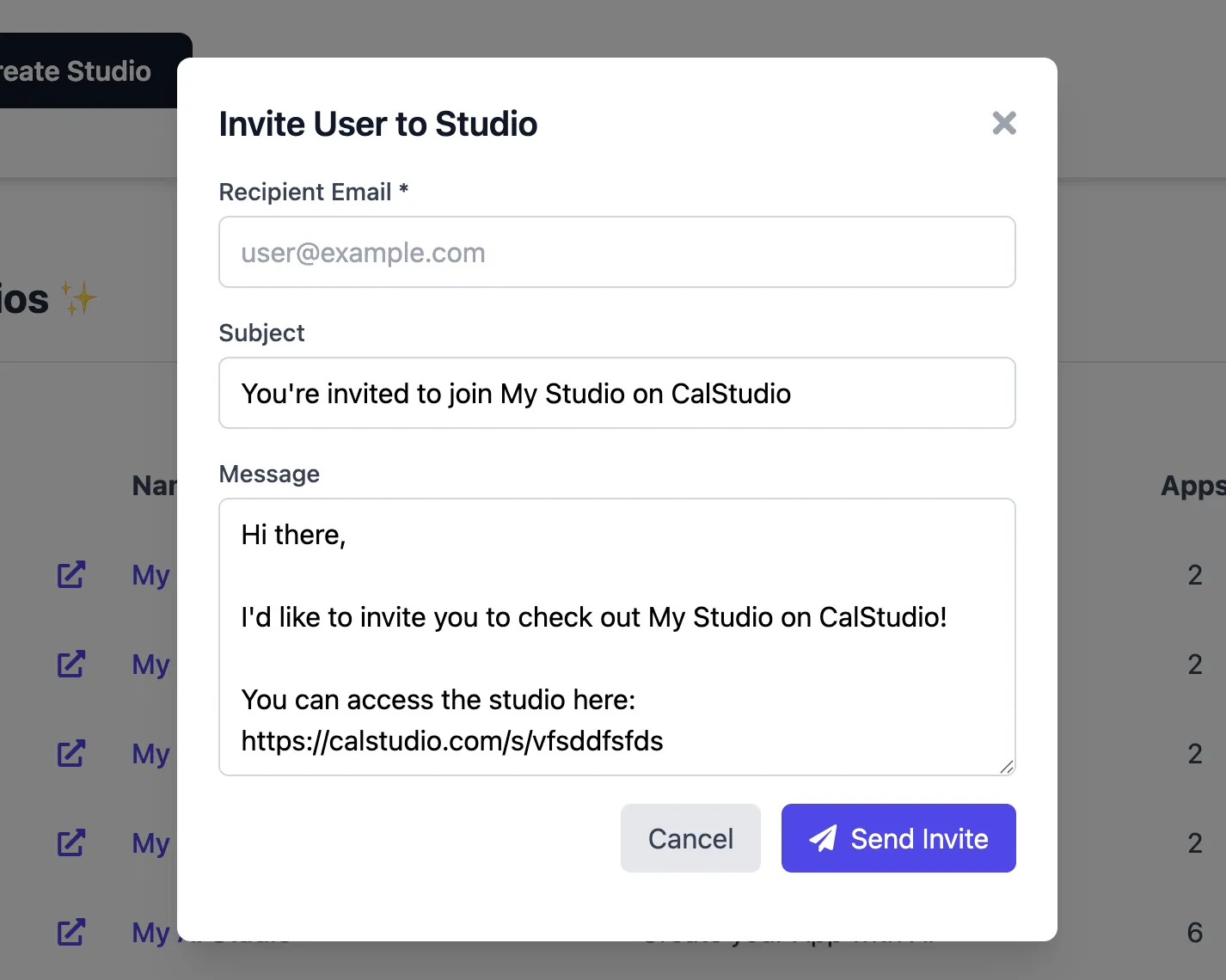
You can now send personalized email invitations directly to users, inviting them to check out your studio or appโgreat for outreach, onboarding new customers, or sharing your creations with potential users.
What this unlocks for you:
โ Send branded invitation emails with a single click
โ Pre-filled email template with your studio/app linkโfully editable before sending
โ Customize the subject line and message body to match your tone
โ Available for both Studios (from /app-studios) and Apps (from /all-apps)
โ Invitation emails include a direct link and your sender details
How to use it?
For Studios: Go to /app-studios, click the 3-dot menu on any studio, and select "Invite User". For Apps: Go to /all-apps, click the 3-dot menu on any live app, and select "Invite User". Enter the recipient's email, customize the subject and message if needed, and hit Send. The user will receive a beautifully formatted invitation email with a link to your studio or app.
December 19th, 2025

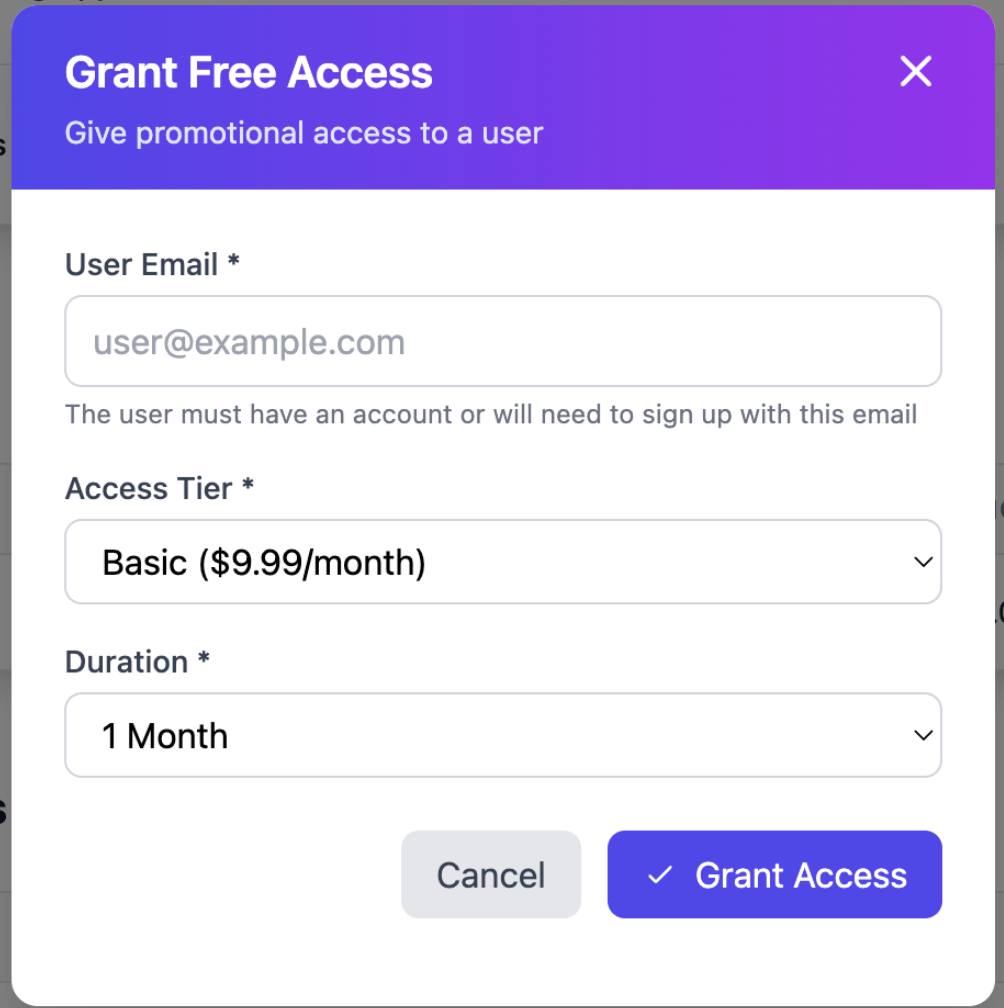
You can now give users free promotional access to your studio directly from the Studio Analytics pageโperfect for running promotions, rewarding loyal customers, or onboarding beta testers without requiring payment.
What this unlocks for you:
โ Grant any user free access to any tier in your studio
โ Set custom durations: 1 week, 1 month, 3 months, up to 1 year
โ Users automatically receive the tier's credits and app access
โ Track promo users separately with a purple "Promo" badge in your subscribers list
โ Automatic email notification sent to users with their access details
How to use it?
Go to your Studio Analytics page, find the Subscribers section, and click "Grant Free Access". Enter the user's email (they must have a CalStudio account), select the tier you want to grant, choose the duration, and click Grant Access. The user will receive an email with a link to access your studio immediately
December 19th, 2025

I'm thrilled to announce that you can now build conversational AI apps on the platform! ๐
Here's what you can now do:
โ Eleven Labs & OpenAI TTS Integration - Choose from high-quality text-to-speech options to give your AI apps natural-sounding voices โก๏ธ
โ Custom Voice Integration - Connect your own voices using your Eleven Labs API key for personalized experiences ๐ฏ
โ Real-time Speech-to-Text - Users can speak naturally to your apps and get voice responses back instantly ๐ฌ
โ Monetization Ready - Generate revenue from your voice apps with subscription options ๐ฐ
How to build a voice app?
From your dashboard, create a new app or edit an existing one. Select "This is a voice app" and you'll now see voice options where you can enable speech-to-text and select your preferred TTS provider (Eleven Labs or OpenAI). If using Eleven Labs, simply add your API key and voice ID to access your custom voices ๐
December 3rd, 2025

You can now use Google's native File Search as your knowledge storage optionโpowered by semantic embeddings that understand meaning, not just keywords. Upload PDFs, docs, spreadsheets, or code files, and Gemini automatically chunks, indexes, and retrieves the most relevant content for every query.
What this unlocks for you:
โ Semantic search that finds answers even when users phrase questions differently
โ Native integration with Gemini models (2.5 Pro, 3 Pro, Flash) for optimal retrieval quality
โ Support for 20+ file types: PDF, Word, Excel, PowerPoint, JSON, Python, JavaScript, etc.
โ Separate stores for files and URLsโupdate one without reprocessing the other
How to enable it?
Edit or create an app using any model, scroll to "Knowledge Storage" under the Data tab, and select "Gemini" from the dropdown. Upload your files or add URLs, then save. Your knowledge base is indexed automatically, no API keys or configuration needed.
November 21st, 2025

I'm very excited to announce that our platform now supports three new groundbreaking models that just dropped in November 2025! ๐
Here is more about these models:
โข Gemini 3 - Google's most intelligent model with state-of-the-art reasoning. Perfect for complex tasks requiring deep context understanding.
โข GPT 5.1 - OpenAI's latest with adaptive reasoning that dynamically adjusts thinking time based on tools. Get faster responses on simple tasks and deeper analysis on complex ones.
โข Nano Banana Pro - Google's next-gen AI image generator with studio-quality output up to 4K, near-perfect text rendering, and character consistency. These models give you unmatched flexibility - whether you're building conversational AI, tackling complex reasoning tasks, or creating stunning visuals, you now have the industry's most advanced models at your fingertips ๐ช๐ฝ
How to use these models? Click on "Create app" from your dashboard or edit an existing app. Select "Gemini 3 Pro", "GPT 5.1", or "Nano Banana Pro" from the AI model dropdown, and your app will immediately start using these cutting-edge models ๐
November 17th, 2025

You can now add a first-time GDPR consent gate to any appโcomplete with customizable legal text and icon. When enabled, visitors must acknowledge your consent message (stored per app/device) before they see pre-chat questions or start a conversation.
What this unlocks for you:
โ Collect clear, auditable consent the first time someone opens your bot
โ Personalize the consent copy and icon to match your brand/tone (Lock, Shield, Check, Handshake, Clipboard)
โ Deliver consistent behavior everywhere: main bot pages, LA/Tokyo/Oslo themes, embeds, and LA embed
โ Keep the consent modal styling intact even when you tweak font colors or themes
How to enable it?
Edit or create an app, scroll to the โRequire GDPR Consentโ setting under General, toggle it on, and customize the text/icon. The change applies instantly across all bot page variants and embeds.
October 24th, 2025

I'm very excited to share that OpenAI's latest video generation model, Sora 2, is now available on our platform! โก
You can now build AI apps that create stunning videos using Sora 2's advanced capabilities. This opens up incredible possibilities for content creation, marketing, and creative projects ๐
How to build a Sora 2 app?
Just like other AI apps, you can create a new app or edit an existing one and select Sora 2 from the AI model dropdown. Your app will immediately start using this model.
Important Notes:
Currently, only the Oslo theme is supported for Sora 2 apps ๐จ
Monetization is temporarily unavailable for this model due to rate limiting constraints ๐
Videos are set to shorter durations by default, but we're working on adding a setting to configure duration soon โฑ๏ธ
October 9th, 2025

I'm thrilled to announce that apps on the platform now support MCP integration! This is a game-changing feature that transforms your AI apps from simple chatbots into powerful agents that can actually take actions ๐
What this means for you as a creator: โ Connect your apps to real-time data (weather, stock prices, CRM systems, etc.) โ Execute multi-step workflows automatically โ Build agents that can perform actions, not just respond to questions โ Universal MCP protocol that works seamlessly across OpenAI models โก๏ธ
How to enable MCP for your app? From your dashboard, click on the edit pencil icon for your app. Once you set the model to OpenAI, you'll see the option of adding MCPs in the Action tab. Each MCP will require a server URL and the MCP name for it to work ๐
September 30th, 2025

I'm excited to announce that your AI studios can now be protected with custom access codes, giving you complete control over who can access your studio content! ๐
This powerful feature lets you gate your entire studio with a single code - perfect for exclusive communities, private content, or member-only access ๐ก๏ธ
How to add an Access Code?
Simply go to your studio dashboard, click edit (or create a new studio), and enter your desired access code in the "Main" tab. Leave it blank for open access โจ
Once users enter the correct code, they'll have full access to your studio and won't need to enter it again. It's that simple! ๐
September 27th, 2025

๐ Gemini models now support a 1 MILLION context window on CalStudio!!! ๐ฅ
โก๏ธ All you have to do is disable RAG and use any Gemini model while building your custom AI app - it's that simple!
๐ก Why this matters:
Building with RAG becomes a problem if you want to incorporate every line of the document in your data.
๐ฏ With 1M tokens, you can literally dump entire books, research papers, or documentation and the model will understand ALL of it without chunking, missing context or retrieval issues ๐ฎ